
When I was preparing for my presentation at Microsoft Tech Summit 2018 in Stockholm I rend into a issue when importing a new VM devices ID the way I have done it in the past. I got an error when uploading the device ID to Windows AutoPilot service in Microsoft Store for Business and Microsoft Intune.
Normally when I test or do demo’s on Windows AutoPilot I install the latest ISO of Windows 10 AzureAD join the device and harvest the device information for AutoPilot.
Error in Microsoft Store for Business:
1 device(s) failed
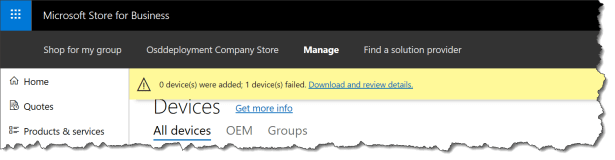
When you download the error messages and open it with notepad the error code : wadp10 and a link to the error documentation

The error wadp010 – “Try that again. Somethings happened on our end. Waiting a bit might help.” this was not a very useful error message in this case .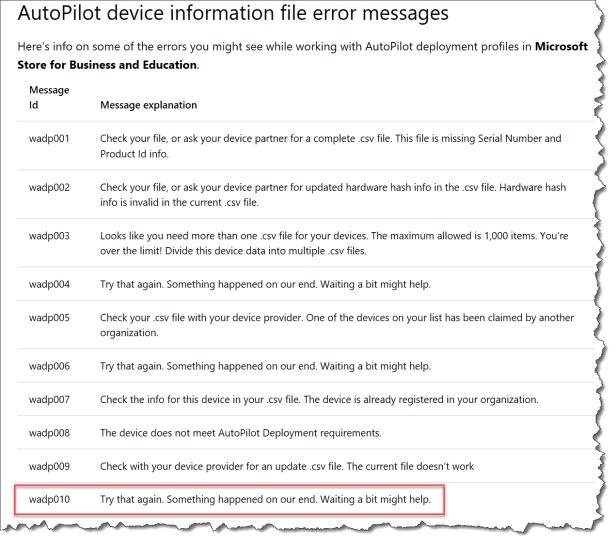
So I went to Microsoft Intune – Windows Autopilot devices for the import

This time I got another error code: 640 – StorageError
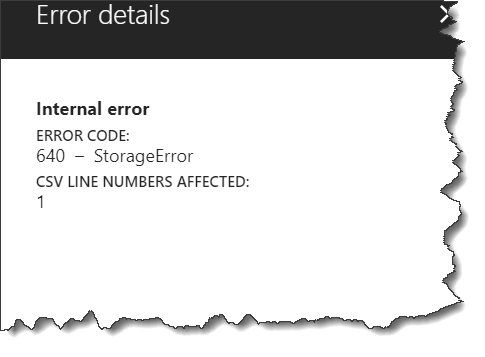
I tried to upload the Windows AutoPilot information to MSfB and Intune multiple times with the same error.
So I tried to find the devices in Intune by searching be the serialnumber

I got 3 hits back in my tenant

I was thinking that if I delete those devices maybe it will help on my problem
So I was searching the device name in Azure AD and deleted the device
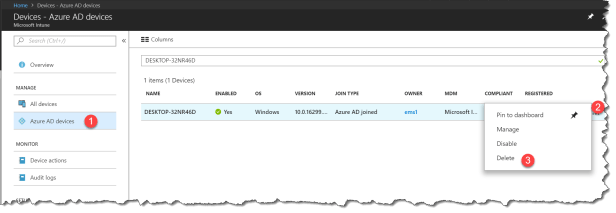
You will get a warring when deleting the device – just click yes

Now the device information is no longer in the AzureAD and upload to Windows AutoPilot service is now working.
I have only seen this issue on VM’s not not on real hardware.
I hope this helps you if you have the same issue. Just go and harvest the device information in another way:
- Boot a VM and start the Windows 10 installtion
- Press Shift-F10 to open a command prompt on the first OOBE screen
- Run script available from http://powershellgallery.com/packages/Get-WindowsAutoPilotInfo/ to gather hardware details
- Upload CSV file to Microsoft Store for Business or Microsoft Intune

 Cloud First
This happened to me with real hardware. I bought 5 devices exactly the same 4/5 imported to Windows Autopilot with no issue. 5th device did not work and I tried using Azure portal and WindowsBusinessStore, After 2 days it worked without me making a change.
we have this issue with both VM’s and physical. We can only see the devices in the Windows Autopilot screen – the devices were deleted from Intune and Azure AD devices, we’re now stuck as we cannot import the device again – any ideas on how to delete the devices from Windows Autopilot devices?