
Starting with Windows 10, version 1803, the device name is no longer collected by default and requires a separate opt-in.
It shows in Windows Analytics Upgrade Readiness that the computer does not have a name after upgrading to Windows 10 1803.

The way to fix it with Intune is to deploy a PowerShell Script that sets the value that allows to computername to be uploaded to Windows Analytics again.
############################################################################################

###################################################################################################
$registryPath = "HKLM:\Software\Policies\Microsoft\Windows\DataCollection"

#Enable AllowDeviceNameInTelemetry
$Name = "AllowDeviceNameInTelemetry"
$value = "1"
IF(!(Test-Path $registryPath))
{
New-Item -Path $registryPath -Force | Out-Null
New-ItemProperty -Path $registryPath -Name $name -Value $value `
-PropertyType String -Force | Out-Null}
ELSE {
New-ItemProperty -Path $registryPath -Name $name -Value $value `
-PropertyType String -Force | Out-Null}
In Intune – create a new PowerShell Script:
-
- Windows Analytics enable device name
- Upload the script
Ensure that the script is running in system context  After the script is applied to the device HKLM\Software\Microsoft\Windows\DataCollection\AllowDeviceNameInTelemetry is set to 1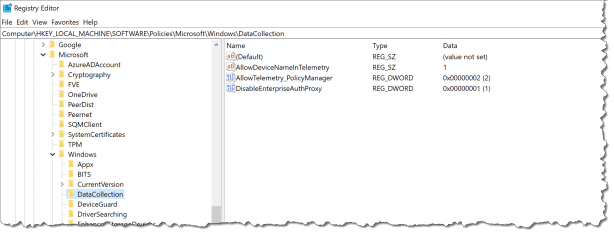
Read more at: Frequently asked questions and troubleshooting Windows Analytics Enrolling devices in Windows Analytics

 Cloud First
Hi, can this be done with Intune in Azure?
Yes
I think the registry key needs to be a DWORD otherwise it does not seem to register the device name in OMS?
Although we have used this, the names still do not show up. Any suggestion?
This script fails. Everything under DataCollection has to be dword except CommercialID. Source: https://docs.microsoft.com/en-us/windows/deployment/update/windows-analytics-get-started
Why not do by policy:
https://docs.microsoft.com/en-us/windows/client-management/mdm/policy-csp-system#system-allowdevicenameindiagnosticdata